Agent templates
Start from a ready-made agent instead of building one from scratch.
A template is a pre-built agent: it already has a model, instructions, tools, and skills chosen for a particular job. Starting from one is the fastest way to get a useful agent, and you can adjust everything afterward.
Open the template picker
- In the left sidebar, open Settings, then under Agent select Agents.
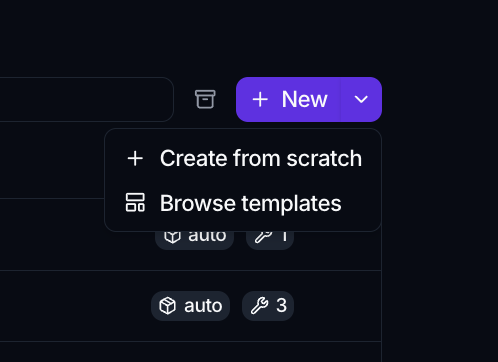
- Click the arrow next to the New button and choose Browse templates.
If the workspace has no agents yet, the empty state offers the same two paths: Browse templates or Create from scratch.
Choose a template
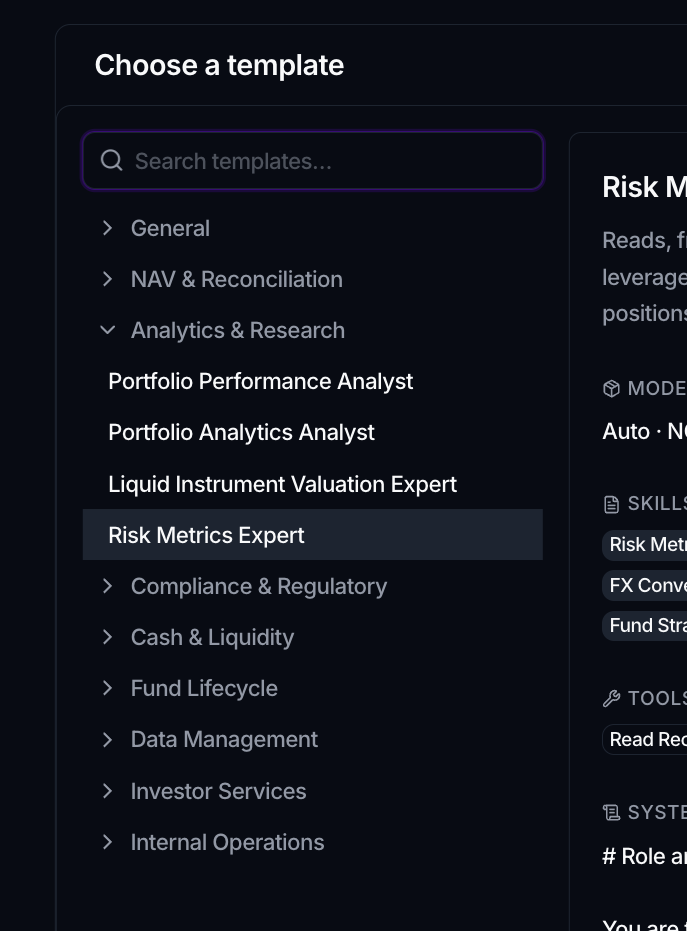
The Choose a template dialog lists templates grouped by area. Use the search box to filter by name, description, persona, or tag. The groups you may see include:
- General
- NAV & Reconciliation
- Analytics & Research
- Compliance & Regulatory
- Cash & Liquidity
- Fund Lifecycle
- Data Management
- Investor Services
- Internal Operations
Select a template on the left to preview its details on the right: its Model, Skills, Tools, System Prompt, and Examples of Requests. This is the best way to understand what the agent is set up to do before you commit.
Create the agent from a template
With a template selected, click Use template. This opens the agent editor pre-filled with the template's configuration.
From here you can:
- Rename the agent and rewrite its Description.
- Adjust the Instructions to match your workspace.
- Change the Model, Temperature, or Thinking effort.
- Add or remove Tools and Skills.
- Bind a Vault if the agent uses connectors that need credentials.
Try it in the Preview panel, then click Save. The saved agent is independent: later changes to the template do not affect it.