Create Your Own Agents
Within Agent Studio, create your own agents or start from a vast template library. Each agent has its own identity, connectors, vaults, permissions and memory. A workflow or an agent orchestrates it, NGT Skills own the procedure, NGT Tools and connectors do the work, and guardrails check the exit.
See it work
From One Sentence to a Trusted Agent
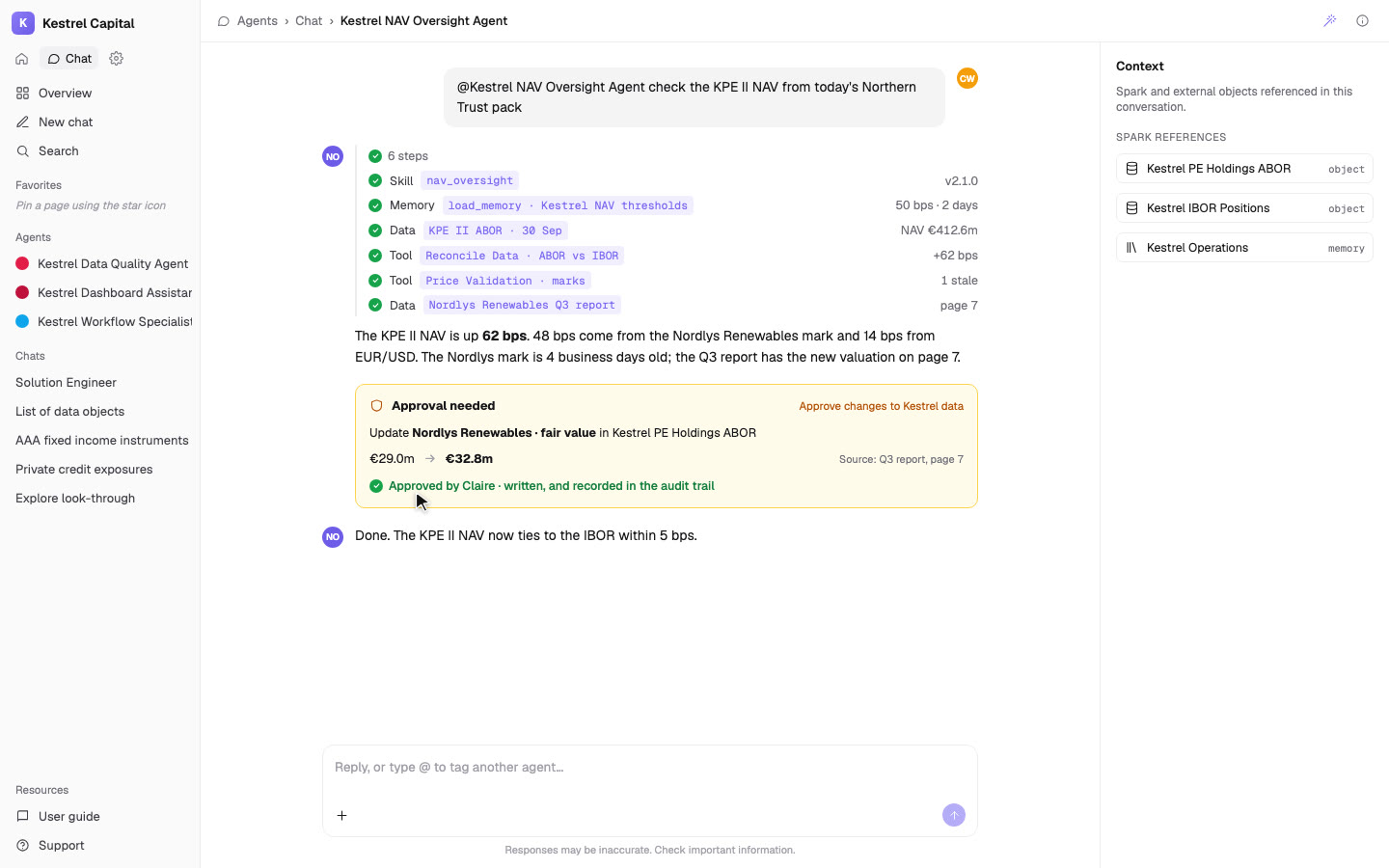
In one sentence. The Solution Engineer drafts it from the right NGT template, with tools, skills and guardrails already chosen.
Control & Trust
Full Control How and Where AI is Used
AI runs inside the same client-segregated environment as your data, storage, and services, with no cross-client visibility.
AI only processes the fund data, transactions, documents, and metadata you uploaded or generated, with optional anonymisation or pseudonymisation.
Data processed by AI is never reused to train shared or external models.
AI relies on enterprise-grade services with encryption, access control, logging, and the same governance model as the rest of the platform.
Enable, restrict, or disable AI at product, client/workspace, feature, or workflow level, including full opt-out.
Plug in your own approved LLMs or AI services within your isolated workspace, with AI usage scoped contractually if required.
Agent Studio
Build Your Own Agents
Agent Studio
Configure agent roles, instructions, and objectives (e.g., Oversight Investigator, Reconciliation Analyst, Onboarding Assistant) with reusable templates.
Human on the Loop by Design
Require review/approval steps for sensitive actions (e.g., publishing, sending, updating) while keeping agent outputs explainable and traceable.
Versioning, Testing, and Monitoring
Iterate safely with agent versions, test runs/simulations, and observable runs so production behavior stays predictable over time.
Workflows
Embed AI Directly Into Your Workflows
Tools in Workflows
Call any NGT Tool or connector as a step: Data ingestion, the Referential data manager, the Entity enricher, any Analytics Tool or the Exception Framework. Or hand the step to an agent.
Human on the Loop
Present AI suggestions as tasks, reviews, or validations inside collaboration dashboards.
Agentic Workflows
Combine rules, data, and AI steps to perform multi-stage operational processes.
Trigger-Based Execution
Invoke AI on file reception, record creation, schedules, or manual triggers.
Explainable Outputs
Review, accept, override, or amend AI results as part of normal operations.
Full Traceability
Track AI inputs and outputs back to source data and workflow steps.
Integrations
Connect to Your Systems and Tools
External System Integration
Invoke AI within workflows that send or receive data via APIs, events, or files.
Internal Tool Connectivity
Query databases, storage, and internal tools as part of AI-assisted processes.
Upstream Data Ingestion
Pull data from custodians, market feeds, and providers before AI structuring or validation.
Downstream Delivery
Push enriched or validated outputs to fund accounting, reporting, or oversight systems.
Integration Actions
Use workflow actions such as Query Database, Search Files, or Send Notifications.
Format Adaptation
Transform AI outputs into the required format for each target system automatically.