Action Inputs
How data moves between actions, how to choose an action's inputs, and the data types Spark checks along the way.
A workflow is a chain, so most actions work on data produced by the actions before them. This page covers how that data flows, how to pick an action's inputs explicitly, and the lightweight type system Spark uses to catch mismatched connections. For the building blocks themselves, see Build a workflow.
Data flows along the connections
By default, data follows the arrows you draw on the canvas: each action reads the output of the action(s) connected into it, and passes its own output on to the next. For a simple linear chain you don't configure anything, the connections carry the data.
Choose an action's inputs
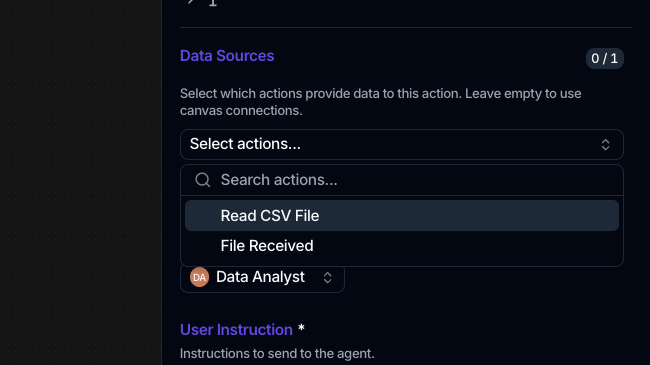
When an action should read from specific earlier steps rather than just its immediate connection, set them in the side panel's Data Sources section:
- The description reads Select which actions provide data to this action. Leave empty to use canvas connections.
- Open the Select actions... picker and choose one or more sources. Only actions that come before this one on the same branch are offered.
- A badge shows how many sources are selected against the maximum, for example 2 / ∞. Some actions require a minimum and warn until it's met (N data source(s) required, …).
A few actions instead take a single named source through a Select source action... picker, for steps that combine two inputs (such as a reconcile or merge).
Data types Spark checks
Every action has an input type and an output type, shown as an icon pair next to the panel title. The types are:
| Type | Meaning |
|---|---|
| Table | Rows and columns, such as parsed CSV records |
| File | A file reference |
| Text | Free text |
| Any | Untyped; connects to anything |
These types keep connections sensible:
- When you pick Data Sources, sources whose output type can't feed this action are hidden.
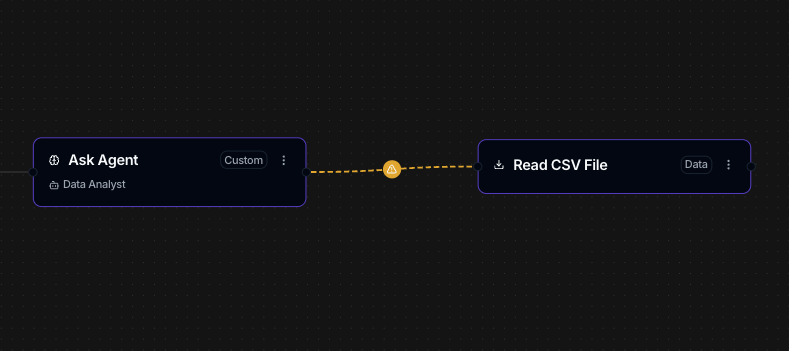
- If a connection's types don't line up, the edge turns into an amber dashed line with a warning like … outputs Table but … expects Text. It's a warning while you edit, not a hard stop, and setting the input explicitly clears it.
- Saving a workflow with a real type mismatch is rejected, so the check is enforced when you save.
Feed a step the previous output
The Ask Agent action has a Use previous action data toggle that passes the prior step's output into the agent's prompt, so the agent reasons over what the workflow just produced. This toggle is specific to Ask Agent.